GLUT
GLUT provides a simple interface for opening & managing windows,
and getting input from the keyboard & mouse.
It also defines a basic program structure - an event loop,
with callback functions.
A callback is a function that you provide for other code to
call when needed; the "other code" is typically in a library - something
that you normally couldn't modify.
GLUT uses callbacks for drawing, keyboard & mouse input, and other
events.
Whenever the window must be redrawn, your drawing callback is called.
Whenever an input event occurs, your corresponding callback is called.
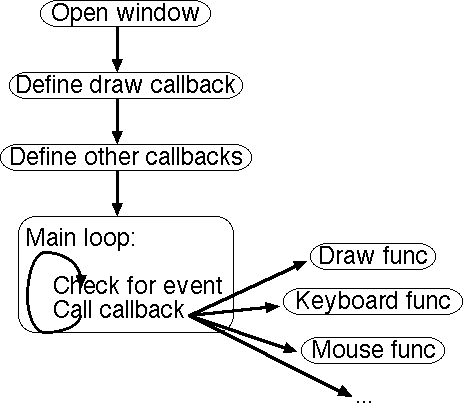
Functions
- glutInit(sys.argv)
- Initialize GLUT
sys.argv is the command-line arguments
- glutInitDisplayMode(mode)
- Tell GLUT what GL-related options the window should have
mode is a bitwise-or'ed (the | operator) subset of:
- GLUT_SINGLE - single-buffered
- GLUT_DOUBLE - double-buffered
- GLUT_RGB - use RGB color
- GLUT_INDEX - use color indexing
- GLUT_DEPTH - allow depth-buffering
(other options exist, but we won't be using them in this class)
- glutInitWindowSize(x,y)
- Set the initial size of the window (in pixels)
- glutInitWindowPosition(x,y)
- Set the window's initial location on the screen (in pixels, from the
upper left corner)
- glutCreateWindow(title)
- Tell GLUT to create the window. The window will not actually appear
immediately.
title is the name of the window.
- glutDisplayFunc(function)
- Gives the name of a function to call whenever the graphics
must be drawn.
- glutKeyboardFunc(function)
- Gives the name of a function to call whenever a key is pressed.
function takes 3 arguments - key, x, y.
key is the key that was pressed; x & y
are the position of the mouse when the key was pressed.
- glutMainLoop()
- Starts GLUT's event loop. This function never returns, so code
after it will not be executed.
next