DynaSight Tracking
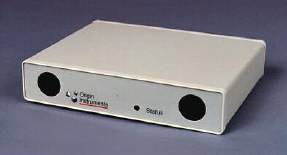
We recently borrowed an Origin Instruments DynaSight Sensor to try out with
the passive stereo VR
system at UB. The DynaSight is an optical tracking device that uses two
infrared cameras to track the 3D position of a retroreflective target.
Our Setup
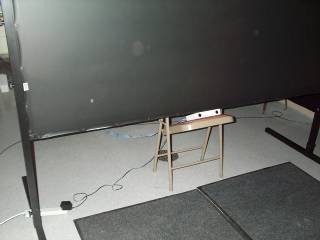
We placed the "transmitter" box immediately below the bottom edge of
the screen (about 2 feet above the floor), tilted up at a 25 degree angle.
This gave us good coverage of the normal working area. Because this was
just a temporary test, we simply placed it on a folding chair; for
public use we need to find a more elegant mounting solution.
We would've also liked to try it with the transmitter above the top of the
screen, looking down, but had no easy way to mount it securely.
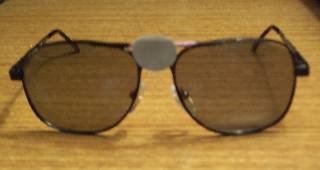
The tracking target was a 20 mm disk, attached to a pair of polarized
stereo glasses.
Evaluation
Overall we were very pleased with the tracker.
Positive points about it are:
- Not having to wear a
clumsy sensor + long wire makes the whole system much nicer.
- Latency appears to be very low.
- Accuracy is better than that of the Spacepad.
- It was very good
at keeping track of the target. You'd have to move the
glasses fairly fast for it to temporarily lose them. But in those cases,
or when you look away from the screen & look back, it re-acquires the
target almost instantly.
- Coverage was better than expected - it was able to track a user over
the full width of the screen, up to about 1.5 feet from the screen, and back
to at least 6 feet from the screen.
Some negative points about the tracker are:
- The data are slightly noisy. When standing still, the image of the
virtual world would often be seen to jump up & down by 1-2 pixels. We
added some smoothing to our tracking daemon, which alleviated this.
- When running at higher reporting rates (60-70 Hz; the default mode
is 30 Hz), the noise is worse.
- It only tracks position, not orientation. For head tracking with a single
screen, this usually isn't a problem.
- Only one target is tracked. Our tracker daemon for the DynaSight
includes an option to merge in data from another daemon, so we were able
to use the Spacepad to track the wand along with the DynaSight for the
glasses (the latest trackd from VRCO may be able to do something similar).
It should be noted that Origin Instruments also sells an
ActiveTarget Adapter
that allows you to track up to four targets and get orientation
as well as position data. However, this appears to be larger, wired
target, and so wouldn't really be an improvement over the Spacepad or
Flock of Birds in terms of basic usability. Whether it's more accurate
or has lower latency than the electromagnetic trackers is unknown.
Also, the DynaSight clearly cannot be used in a full CAVE system
as it stands. One would need to use several transmitters to cover all
possible directions that users might look, and would have to come up
with some good way to get orientation data (since this is necessary for
proper stereo when the user looks at different walls).
Tracker Daemon
We have written two different tracker daemons for the DynaSight.
The first is just a very minimal daemon that reads the tracking data
and writes it to trackd shared memory. The second adds several features,
including smoothing, rotating the transmitter, and adding data from
another trackd; this daemon has been tested under both Linux and
IRIX 6.5. The source code for both programs is below; they both
use the same dyna-trackd.h header file.
dyna-trackd-basic.c
dyna-trackd2.c
dyna-trackd.h
dyna-trackd2 Usage
The command-line options for dyna-trackd2 are as follows:
- --shem key
- Tells the daemon to use the shared memory segment key number key.
The default is 9900.
- --port portname
- Gives the device name of the serial port that the DynaSight is connected
to. The default under Linux is /dev/ttyS0; the default under IRIX is
/dev/ttyd2.
- --offset x y z
- An x/y/z offset to add to the position data. The value should be in feet.
The default is 0 0 0.
- --xrot angle
- The rotation of the transmitter about the X axis (i.e. how much it's tilted
up or down). The value is in degrees. The default is 0.
- --mode retro
- --mode stereosync
- --mode stereosync60
- Sets the tracker to "Retro", "StereoSync", or
"StereoSync60" mode.
In Retro mode it will report at 30 Hz; in StereoSync, with no stereo input,
it will report updates at 37 Hz; in StereoSync60, with no stereo input,
it will report at 64 Hz.
See DynaSight manual for further details. The default mode is retro.
- --smooth num-readings
- Tells the daemon to smooth the data by averaging the last num-readings
values on each update. This is off by default.
- --lock min-distance
- Tells the daemon to lock the reported position when the tracker does not
move much. If the distance from the latest reading to the last reported
reading is less than min-distance feet, the new data is not
reported. The default is 0 (no locking).
- --othertracker key
- Tells the daemon to also get data from another tracker daemon, whose
shared memory segment key number is key. The DynaSight data
will be reported as sensor 0; all sensors except sensor 0 will be copied
from the other daemon any time they change.
- --help
- Prints a summary of the command line options.
Last updated 26 April 2002.
home page